
Proctoring Tips
Exams are timed and have scheduled breaks, so they should not be paused unless there is an emergency or a student has an accommodation for frequent breaks. In-person proctors may pause and resume the exam on the Proctoring tab.
To resume the test, the student should re-launch the exam, select “Start My In Person Exam” and re-enter the session number. The proctor can then approve the exam through the Proctoring tab
Third-party proctors do not have access to pause an exam in an emergency. In that case the student should disconnect from the exam by closing their browser. When they return, they will enter their registration code again. Their progress and exam clock will resume where they left off.
Proctoring in ITS
Proctoring Best Practices
Proctoring In-Person Exams

Proctoring Quick Guide
Download the GuideProctoring Process Overview
Instructions for Remote Proctoring Setup
Remote Proctor InstructionsSample Proctor Instructions – ITS
More Proctor Resources
Frequently Asked Questions
Proctoring
They will use the same session number unless they’ve been assigned to another session because they were moved to another test room.
If they are taking their exams in the same room, you can add those exams to the same proctoring session and everyone will use the same session number.
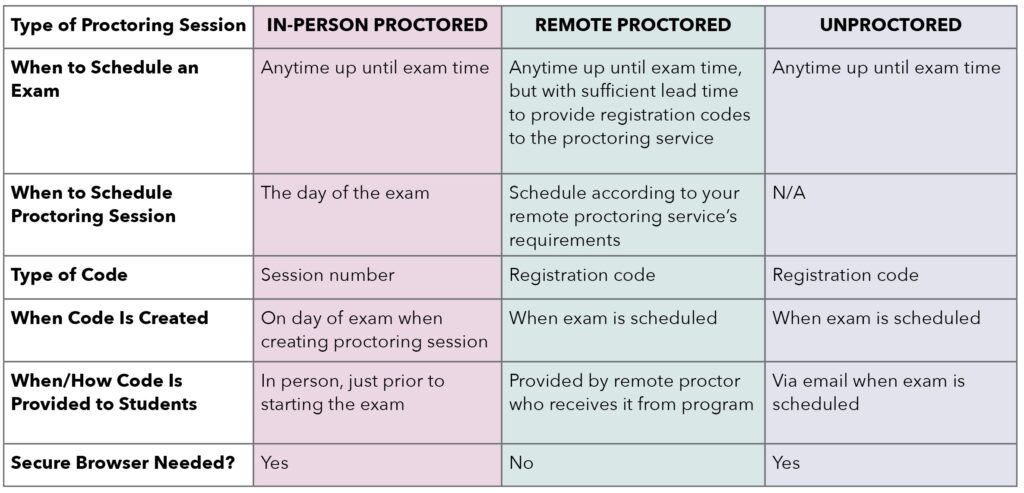
Session codes for in-person exams are created the day of the exam. Students taking Unproctored exams receive their Registration Codes in advance via email. Students taking remote proctored exams will be given their Registration Codes by their proctor, but they are created at time of scheduling to be given to the remote proctoring service.
Remote Proctored and Unproctored exam registration codes can be downloaded in the Scheduling screen. Students taking Unproctored exams also get their registration code by email.
The In-Person exam Session Code is a 6-digit number, and PAEA recommends that you share this with students in the test room either orally, or on a board or sreen in the room.
A proctoring session must be created on the day of the exam.
Students can re-enter the session code, email, and their last name to come up for approval again.
Yes, the student can see it or hide it in their exam. And the proctor can see it for each individual student.
The third-party remote proctoring service may offer recordings to review any issues as part of their service. PAEA does not offer such a service at this time, so please reach out to your preferred provider.
Proctors will have access to all the same information, including sessions that another proctor initially created.
Yes – any user with access to the Proctor screen can view and use a session. Additionally, the proctor can be different from the person who schedules the proctoring session.
PAEA does not offer third party remote proctoring services at this time.
Students in In-Person exams will only be able to start their exam in Secure Browser.
Yes, you can approve all students that are waiting in your session or approve them one at a time.
No, responses are uploaded in real time. They will not need to upload their responses at the end.
The answer is this depends. Many third-party remote proctoring services use their own lock down browsers and tools that interfere with Secure Browser. If you have questions about a specific remote exam administration process please email exams@PAEAonline.org.